Rich Translations
When configured to do so, owo-lib can parse some translation files in a special way which allows for the use of Text Components. You can look up the relevant vanilla JSON format on the Minecraft wiki.
Setup
Before you can use Rich Translations, you need to enable it in 1 of 2 ways:
- Enable oωo's Json5 Data Loading and use a
.json5file. - Add a key
owo:rich_translationsorowo:extended_langwith the valuetrueor1anywhere in your translation file (at the top level).
Basic Example
For demonstrating the basics, let's change the name of the Echo Shard. We want the word "Shard" to be of this blue color, which is achieved by the following simple JSON:
{
    ...
    "item.minecraft.echo_shard": [
        "Echo ", // (1)
        { "text": "Shard", "color": "#0096FF" } // (2)
    ],
    ...
}- You can use plain strings if you don't require any special formatting on a bit of text
- You can use any color you want, text components support parsing of hex colors in RRGGBB format
This yields the following result:

Let's continue by also altering the Recovery Compass to say that it's made of Echo Shards. To do this, we do a normal translation and refer to the echo shard's translation via the translate object.
{
    ...
    "item.minecraft.echo_shard": [
        "Echo ",
        { "text": "Shard", "color": "#0096FF" }
    ],
    "item.minecraft.recovery_compass": [
        "", // (1)
        { "text": "Recovery Compass", "color": "yellow" }, // (2)
        " made of ",
        { "translate": "item.minecraft.echo_shard" }
    ]
    ...
}
The style of the first bit of text is applied to all later ones. Since we don't want the entire name to become yellow, we simply specify an empty, unformatted first element.
You can also refer directly to the name of any of Minecraft's 16 text colors directly instead of using hex codes
This produces this nice tooltip, with the Echo Shard's name conveniently embedded

Translatable Text Parameters
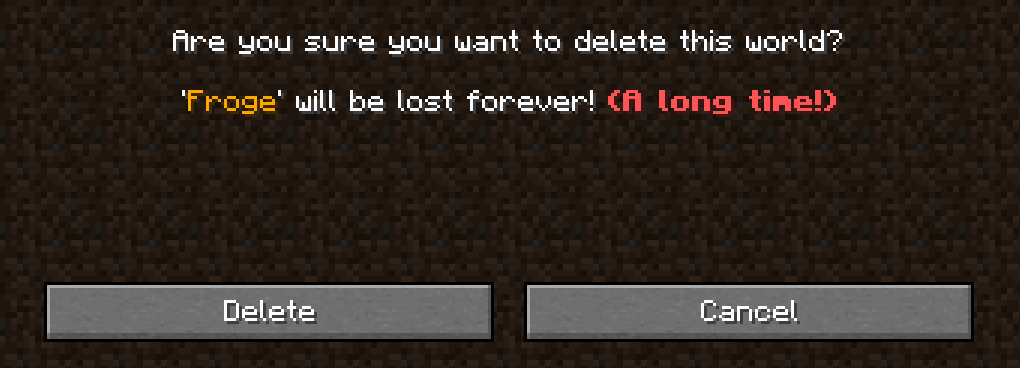
As you probably know, a translatable text can have parameters - defined in standard translations via format specifiers like %s. This is not available to us when writing a rich translation, thus we must use owo's equivalent - the replacing text content, specified by an index object in the JSON. To demonstrate this, let's spice up the warning that get when deleting a world - it contains a parameter for the name of the world to delete.
{
    ...
    "selectWorld.deleteWarning": [
        "'",
        { "index": 0, "color": "gold" }, // (1)
        "' will be lost forever! ",
        { "text": "(A long time!)", "color": "red", "bold": true}
    ]
    ...
}- Here we employ the
indexobject. The number you specify is the index of the parameter passed into the translatable text constructor. It accepts style options like any other text component, as demonstrated by the gold color.
The final result looks like this: